What Is A Subheading And Its Critical Role In Content Structure
Table of Contents
- Definition and Core Purpose of Subheadings in Written Content
- Structural Breakdown of Subheadings and Readability Enhancement
- Cognitive Mapping and Information Flow Alignment
- Empirical Evidence: Subheadings in Professional and Academic Writing
- Design Principles for Effective Subheadings
- Common Pitfalls and Best Practices
- Structural Formats and Variations in Subheadings
- Hierarchical Implications of HTML/CSS Subheading Tags
- Comparison of Subheading Formats Across Platforms
- Unconventional Subheading Techniques and Contextual Appropriateness
- Psychological and Design Principles Underlying Effective Subheadings
- Leveraging the Zeigarnik Effect Through Subheading Design
- Step-by-Step Guide to Crafting Curiosity-Triggering Subheadings
- Eye-Tracking Studies and Subheading Influence on Scan Paths
- Practical Applications of Subheadings in Industry-Specific and Multimedia Contexts
- Industry-Specific Subheading Templates with Before/After Revisions
- Adapting Subheadings to Multimedia Content
- Tools and Automation for Subheading Optimization
- Comparison of Three Tools for Subheading Optimization
- Python Function for Subheading Extraction and Inconsistency Detection
- `–` `) or Markdown syntax (`#`–`######`). Validates hierarchy (e.g., no H3 without an H2 ancestor). Flags missing or duplicate subheadings. Outputs a structured report (CSV/JSON) for manual review. For HTML documents, the function prioritizes semantic validation (e.g., ensuring ` ` precedes ` `), while Markdown processing focuses on syntax consistency (e.g., `#` vs. `##`). Pseudo-Code Outline: import re from bs4 import BeautifulSoup # For HTML parsing import markdown_it # For Markdown parsing def extract_and_validate_subheadings(document, format_type="html"): """ Extracts subheadings from a document and checks for formatting inconsistencies. Args: document (str): Raw HTML/Markdown content. format_type (str): "html" or "markdown". Returns: dict: Report with headings, depth, and issues. """ headings = [] issues = [] if format_type == "html": soup = BeautifulSoup(document, "html.parser") for tag in soup.find_all(["h1", "h2", "h3", "h4", "h5", "h6"]): depth = int(tag.name[1]) text = tag.get_text().strip() headings.append({"depth": depth, "text": text, "line": tag.sourceline}) Check hierarchy
- Check for invalid depth (e.g., # after ##)
- Main Topic
- Subtopic A
- Another Topic
- Orphaned Subtopic
- CSS and Markdown Styling for Accessible Subheadings
- / ` hierarchy, and avoidance of questions/commands). ### Intro Subheadings are the scaffolding of structured content, ensuring readability, SEO optimization, and user engagement. In technical documentation, blog posts, and multimedia contexts, well-crafted subheadings guide readers through complex topics while improving metrics like time-on-page and bounce rate. This guide dissects real-world applications—from corporate FAQs to API guides—and demonstrates how subheadings can reduce support tickets by preemptively addressing user pain points. Below, we analyze case studies, rewrite poorly structured sections, and align formatting with industry best practices (e.g., UTF-8 encoding, semantic HTML, and Markdown consistency). ### Example Output (Structured Content) ```html Case Studies and Real-World Impact of Subheadings
- 1. Improving a Corporate FAQ with Subheadings
- Password Recovery Process
- 2. Reducing Support Tickets in API Documentation
- OAuth 2.0 Flow: Client Credentials Grant
- 3. Whitepaper Rewrite: From Vague to Actionable
- AI’s Role in Healthcare: From Diagnostics to Drug Discovery
- FAQ
- What exactly is a subheading in an article and why is it used?
- Can you give me an example of what a subheading looks like in writing?
- How do you format a subheading in APA style, and what levels are there?
- What role do subheadings play in a research paper, and are they mandatory?
- Do essays require subheadings, and if so, how should they be structured?
- What is the purpose of subheadings in a paper, and how do they differ from headings?
Subheadings serve as the silent architects of readability, transforming dense blocks of text into navigable pathways for the reader’s mind. Beyond their visual hierarchy, they function as cognitive anchors—segmenting information into digestible chunks while guiding attention through logical progression. Whether in academic research, marketing campaigns, or technical manuals, their strategic placement can mean the difference between engagement and disengagement, clarity and confusion.
Their effectiveness lies not just in typography but in psychology: subheadings exploit the Zeigarnik Effect by leaving mental "hooks" that compel further exploration, while their structural variations—from numbered lists to rhetorical questions—adapt to diverse audiences. This exploration delves into their dual role as both functional tool and persuasive device, examining how they shape perception across media and industries.
Definition and Core Purpose of Subheadings in Written Content
Subheadings serve as navigational signposts in written content, guiding readers through complex information by breaking it into digestible segments. Beyond visual hierarchy, they fulfill a cognitive function by aligning with how the human brain processes structured data—organizing ideas into hierarchical relationships (e.g., main themes, supporting details, or sequential steps). Research in cognitive psychology, such as the work of Miller (1956) on chunking, demonstrates that readers retain information more effectively when it is segmented into meaningful units rather than presented as dense blocks of text. Subheadings reduce cognitive load by providing mental anchors, allowing readers to anticipate content flow and skip to relevant sections without losing context.The primary role of subheadings extends to improving comprehension and engagement. Studies in usability (e.g., Nielsen, 2010) indicate that readers spend only 20% of their time reading text word-for-word, relying instead on skimming techniques. Well-structured subheadings act as decision points, enabling readers to assess relevance and prioritize sections based on their interests or needs. For instance, a poorly structured section might present a problem-solution pair without clear demarcation, forcing readers to parse through unrelated details. In contrast, a subheading like "Implementation Challenges and Mitigation Strategies" immediately signals the transition from identifying issues to proposing solutions, adhering to a problem-solution cognitive framework.
Structural Breakdown of Subheadings and Readability Enhancement
Subheadings improve readability by segmenting text into logical chunks, each serving a distinct purpose in the information hierarchy. This segmentation leverages the Gestalt principle of proximity, where elements grouped together are perceived as a unified whole. For example, a blog post on "Digital Marketing Trends in 2024" might use subheadings to separate:A poorly structured section might merge these into a single paragraph, overwhelming readers with mixed information types. Conversely, a well-structured version uses subheadings to categorize content by function, such as:
This approach mirrors information scent theory (Pirolli & Card, 1999), where subheadings act as odors—signals that guide readers toward relevant content without requiring exhaustive reading.
Cognitive Mapping and Information Flow Alignment
Subheadings facilitate cognitive mapping by structuring content to match natural thought processes. For instance:"Subheadings are not just labels—they are cognitive scaffolding that reduce the mental effort required to reconstruct meaning from text." — Daniel T. Willingham, Cognitive ScientistExample of Misalignment vs. Alignment:
-
Target Audience Segmentation
- Demographic-based strategies for B2B vs. B2C.
- Psychographic triggers in content creation.
- SEO tactics for high-intent keywords.
- Platform-specific engagement metrics (e.g., LinkedIn vs. Instagram).
Empirical Evidence: Subheadings in Professional and Academic Writing
Data from academic journals (e.g., Journal of Documentation, 2018) show that documents with subheadings achieve:In technical writing, subheadings reduce error rates in procedural tasks by 25% (ISO 9241-11 standard). For example, a user manual for software installation might use:
This mirrors instructional design principles, where subheadings act as performance support tools, guiding users through complex workflows.
Design Principles for Effective Subheadings
Subheadings must balance clarity, conciseness, and hierarchy. Key guidelines include:| Effective | Ineffective |
|---|---|
| "Best Practices for Remote Teams" | "How to Improve Remote Team Productivity: Tips and Tricks" |
| "Case Study: Netflix’s Algorithm Evolution" | "Looking at Netflix and How Their Recommendation System Changed Over Time" |
"A subheading should answer the question: ‘What will the reader learn in this section?’ in under 10 words." — Robert Bringhurst, The Elements of Typographic StyleReal-World Application:
Common Pitfalls and Best Practices
Pitfall 1: Overuse or UnderusePitfall 2: Misleading or Vague Labels
Pitfall 3: Inconsistent Hierarchy
Best Practice Checklist:
- Align with Content: Each subheading should introduce a distinct idea or step in the narrative.
- Prioritize Reader Needs: Use question-based subheadings sparingly (e.g., "How to Fix a Leaking Pipe" vs. "Plumbing Repair Guide").
- Test for Clarity: Ask: "Would a reader unfamiliar with the topic understand the section’s purpose from the subheading alone?"
- Avoid Redundancy: Do not repeat the main heading (e.g., avoid *"Mark
Structural Formats and Variations in Subheadings
Subheadings serve as navigational anchors within written content, guiding readers through complex information while reinforcing logical flow. Their structural formats—ranging from hierarchical HTML/CSS tags to stylistic variations—directly influence readability, SEO optimization, and accessibility. Below, the most common subheading styles are categorized by their hierarchical implications, followed by a comparative analysis across platforms and unconventional techniques tailored to specific contexts.
Hierarchical Implications of HTML/CSS Subheading Tags
The hierarchical structure of subheadings is primarily defined by HTML heading tags (H1–H6), where each level signifies a nested relationship between topics. For instance, an H2 typically represents a primary section under an H1 (main title), while H3 and H4 further subdivide content into subtopics and granular details, respectively. CSS styling (e.g., font size, weight, or color) can enhance visual distinction but must align with semantic meaning to avoid misleading screen readers or search engines.Key Hierarchical Rules:
- H1 is reserved for the document’s main title; multiple H1 tags may confuse search engines and assistive technologies.
- H2–H6 should follow a descending order, with H2 as the highest subheading level under H1.
- Skip levels (e.g., H1 → H3) only when necessary, as abrupt jumps disrupt logical progression.
- Accessibility best practice: Ensure heading tags reflect the document’s outline structure, not just visual styling.
Semantic HTML prioritizes meaning over presentation. A heading styled as bold text via CSS but marked as a paragraph (
) fails to convey structural hierarchy to users relying on screen readers.
Comparison of Subheading Formats Across Platforms
Subheading styles vary by platform to align with audience expectations, content density, and medium-specific conventions. Below is a comparative table outlining common formats, their use cases, perceptual impacts, and accessibility considerations.
Format Typical Use Case Reader Perception Impact Accessibility Considerations HTML H2–H6 with default styling (e.g., bold, larger font) - Academic papers (section/subsection divisions)
- Technical manuals (procedural steps)
- Blogs (topic categorization)
- Conveys clear hierarchy; readers expect logical progression.
- Default styling ensures familiarity across devices.
- May feel rigid in creative or narrative-driven content.
- Screen readers announce heading levels, aiding navigation.
- Ensure sufficient color contrast (minimum 4.5:1 for normal text).
- Avoid relying solely on color to denote hierarchy (e.g., red H2s).
Numbered headings (e.g., "1. Introduction," "2.1 Methodology") - Technical reports (step-by-step processes)
- Legal documents (article/section references)
- Instructional guides (ordered workflows)
- Enhances scannability for complex, sequential content.
- May feel overly formal for casual or marketing content.
- Implicitly signals importance (e.g., "Step 3" implies criticality).
- Screen readers announce numbers sequentially; useful for structured navigation.
- Ensure numbers are part of the heading text (not images) for compatibility.
- Provide a logical restart for each new section (e.g., "1," "2" in Chapter 1; "1," "2" in Chapter 2).
Bold or italic text without semantic tags (e.g., " Key Insight
")- Marketing copy (highlighting benefits)
- Social media posts (emphasizing calls-to-action)
- Informal blogs (casual tone)
- Less hierarchical; may blend with body text.
- Perceived as less authoritative than heading tags.
- Can improve engagement in non-technical audiences.
- Screen readers treat bold/italic text as regular content; reduces navigability.
- Use ARIA labels (e.g., ) if semantic tags are unavailable.
- Avoid as primary navigation aids.
Visual metaphors or icons (e.g., "🔍 Search Tips," "⚡ Pro Tip") - UX/UI documentation (interactive elements)
- Educational content (engagement hooks)
- Mobile apps (space-constrained interfaces)
- Increases visual appeal and memorability.
- May alienate audiences if overused or unclear.
- Icons must be universally recognizable (e.g., 📝 for notes).
- Provide text alternatives (alt text) for icons to ensure screen reader compatibility.
- Avoid relying solely on color or emojis to convey meaning.
- Test with users who may not perceive visual cues (e.g., colorblindness).
Unconventional Subheading Techniques and Contextual Appropriateness
While traditional subheadings prioritize clarity, unconventional styles can serve specific purposes—such as engaging readers, simplifying complex ideas, or aligning with brand voice. Below are examples with their contextual applications and risks.Contextual Examples:
1. Rhetorical Questions
- Example: "What If Your Data Tells a Different Story?" (Marketing case studies)
- Appropriateness: Effective in persuasive or narrative-driven content to provoke curiosity. Avoid in technical documents where directness is critical.
- Risk: May confuse readers if the answer isn’t immediately clear.
2. Emojis or Symbols
- Example: "✨ The Hidden Costs of Ignoring UX" (Tech blogs)
- Appropriateness: Suitable for social media, informal blogs, or creative industries (e.g., design portfolios). Ensure emojis are culturally neutral and accessible.
- Risk: Can appear unprofessional in academic or corporate settings.
3. Visual Metaphors or Analogies
- Example: "Your Content Pipeline: A Traffic Light System" (SEO guides)
- Appropriateness: Ideal for explaining abstract concepts (e.g., "Red = Stop," "Green = Optimize"). Works best when the metaphor is intuitive and reinforced with visuals.
- Risk: Overused metaphors may dilute credibility or confuse readers unfamiliar with the analogy.
4. Fragmented or Poetic Phrases
- Example: "Breaking the Silence: When Algorithms Fail" (Ethics in AI reports)
- Appropriateness: Fits opinion pieces, thought leadership articles, or content aimed at emotional resonance. Pair with clear subtext to avoid ambiguity.
- Risk: May obscure the topic’s core message if not balanced with structure.
5. Interactive or Clickable Headings
- Example: "[Expand] Common Misconceptions" (FAQ sections)
- Appropriateness: Useful in digital platforms (e.g., accordions, tooltips) to reduce clutter. Ensure functionality is intuitive
Subheadings function as cognitive anchors in written content, leveraging psychological mechanisms to guide attention and retention. Among these, the Zeigarnik Effect—a phenomenon where incomplete or unresolved mental tasks remain salient in memory—plays a critical role. By framing subheadings as "unfinished" prompts (e.g., "The Hidden Cost of [Topic]"), writers exploit this effect to sustain reader curiosity, reducing passive skimming and encouraging deeper engagement. This principle aligns with information scent theory, where subheadings act as navigational cues that signal relevance and urgency, particularly in digital environments where attention spans are fragmented.Psychological and Design Principles Underlying Effective Subheadings
The design of subheadings must also integrate microcopy and UX writing techniques to maximize impact. Power words (e.g., "uncovered," "exposed," "proven") and scarcity framing ("only 3% of readers know this") create cognitive tension, while hierarchical contrast (font weight, color, or spacing) directs visual attention. Below, we explore how these principles interact to optimize subheadings for both psychological engagement and structural clarity.
Leveraging the Zeigarnik Effect Through Subheading Design
The Zeigarnik Effect explains why incomplete tasks or unresolved questions linger in working memory, compelling the brain to seek closure. Subheadings exploit this by:
- Creating anticipation: Phrases like "Why [Industry] Is Failing at [Key Metric]" imply an unresolved mystery, prompting readers to "complete" the thought by engaging with the content.
- Fragmenting information: Breaking long sections into digestible chunks with subheadings mimics the effect of interrupted tasks, reinforcing memory retention (a principle validated by studies on chunking theory in cognitive psychology).
- Triggering curiosity gaps: Subheadings that pose implicit questions (e.g., "The Truth About [Common Belief]" vs. "Debunking [Common Belief]") activate the brain’s default mode network, associated with daydreaming and problem-solving.
Research in persuasive writing (e.g., Cialdini’s Influence) demonstrates that curiosity-driven subheadings increase time-on-page by up to 40% compared to neutral or declarative alternatives. For example, a subheading like "The One Mistake 90% of [Audience] Make" leverages social proof and loss aversion—two additional psychological triggers—to heighten relevance.
Step-by-Step Guide to Crafting Curiosity-Triggering Subheadings
To design subheadings that align with psychological principles, follow this structured approach:1. Identify the Core Psychological Lever
Begin by selecting a primary trigger from the table below, based on the content’s goal (e.g., education, persuasion, or retention). Each lever corresponds to a distinct subheading template.
2. Incorporate Power Words for Emotional ResonancePsychological Lever Subheading Template Example Curiosity Gap "The [Adjective] Secret Behind [Topic]" "The Shocking Secret Behind Why Top Performers Quit" Scarcity/FOMO "Only [X]% of [Audience] Know This" "Only 12% of Marketers Know This About AI Content" Authority/Social Proof "How [Expert/Company] [Acted/Used] to [Result]" "How Google’s Top Engineers Fix Broken Code in 3 Steps" Loss Aversion "The [Negative Outcome] You’re About to Avoid" "The $10,000 Mistake You’re About to Avoid in [Industry]" Progress Principle "Step [X] of [Y]: [Action]" "Step 2 of 5: How to Reverse-Engineer Your Competitors’ Strategy"
Power words amplify the subheading’s impact by tapping into primal emotions. Use them sparingly (1–2 per subheading) to avoid dilution. Common categories include:
- Urgency: "Critical," "Immediate," "Now"
- Exclusivity: "Hidden," "Secret," "Insider"
- Conflict: "War," "Battle," "Crash"
- Transformation: "Rebuild," "Unlock," "Master"
Example transformation:
- Original: "Best Practices for Email Marketing"
- Optimized: "The 3 Email Tactics That 10X Your Open Rates (Most Marketers Miss)"
3. Apply Scarcity Framing with Data Anchors
Scarcity framing works best when paired with specific, verifiable data to avoid skepticism. Use statistics from reputable sources (e.g., industry reports, case studies) to reinforce credibility.Example:
- Weak: "Most people fail at this."
- Strong: "93% of SaaS companies fail at onboarding—here’s how to fix it" (Source: Gartner, 2023)
4. Test for Hierarchical Clarity in Digital vs. Print
Subheadings must adapt to medium-specific scan paths:
- Digital: Shorter, bolder, and placed above the fold. Use F-pattern scanning (left-aligned, top-to-bottom) by positioning subheadings early in paragraphs.
- Print: More descriptive but concise (3–7 words). Leverage Z-pattern scanning by centering subheadings vertically.
5. Validate with A/B Testing
Use tools like Hotjar or Google Optimize to compare engagement metrics (e.g., time-on-page, scroll depth) between subheading variants. Metrics to track:
- Click-through rates (CTR) on linked subheadings.
- Dwell time on sections with vs. without curiosity-driven subheadings.
Eye-Tracking Studies and Subheading Influence on Scan Paths
Empirical research on eye-tracking patterns reveals that subheadings significantly alter how readers process content, with distinct differences between digital and print media. Below are key findings synthesized from studies by Jacob Nielsen (Nielsen Norman Group), Rayner (2009), and Dysons et al. (2016):
"Subheadings act as visual waypoints, reducing cognitive load by segmenting text into 'chunks' that align with the brain’s working memory capacity (~4±1 items, per Miller’s Law). In digital environments, subheadings increase fixation duration by 28% compared to body text, while in print, they accelerate scan speed by 15% by guiding the eyes along predictable paths." — Nielsen Norman Group, 2018
Key observations:
- Digital Media:
- Readers spend 60% more time on subheadings containing power words (e.g., "uncovered," "proven") than neutral alternatives.
- F-pattern scanning dominates: subheadings in the top-left corner receive 3x more fixations than those in the bottom-right.
- Mobile users prioritize subheadings with bold typography or contrasting colors, with a 40% higher likelihood of engaging with content if the first subheading appears within the first 500 pixels.
- Print Media:
- Subheadings reduce regressive saccades (backward eye movements) by 22%, improving reading fluency.
- Centering subheadings vertically aligns with the Z-pattern, increasing comprehension scores by 12% in academic texts (Dysons et al., 2016).
- Length matters: Subheadings with 5–7 words yield the highest recall rates, as they balance specificity and brevity.
Practical Implications for Design: - Digital: Use hierarchical contrast (e.g., H2 for main sections, H3 for subtopics) with variable font weights to mimic the F-pattern.
- Print: Align subheadings with the baseline grid of body text to maintain visual harmony, and limit line length to 45–75 characters for optimal readability.
- Cross-Media: Avoid all-caps subheadings in digital contexts, as they reduce readability by 18% due to increased cognitive effort in decoding (Rayner, 2009).
- 3.2.1 Initial Deposit: The Client shall remit 30% of the total contract value ([Currency] [Amount]) within [X] business days of signing.
- 3.2.2 Progress Payments: Invoices for Phase 1–3 deliverables shall be submitted with [Y] days of completion, payable within [Z] days.
- 3.2.3 Late Fees: Failure to pay within the stipulated period incurs a 1.5% monthly penalty on overdue amounts.
- Precision: Legal subheadings must use numeric or alphanumeric hierarchies (e.g., "1.1", "3.2.1") to facilitate cross-referencing.
- Actionability: Verbs (e.g., "shall remit," "shall submit") replace passive phrasing to enforce obligations.
- Definitions Upfront: Critical terms are bolded and defined immediately to avoid ambiguity.
- Source: Based on Uniform Commercial Code (UCC) drafting standards and American Bar Association guidelines for contract clarity.
- Subjects: C57BL/6J male mice (n=40, 8–10 weeks old) randomized into treatment (n=20) and control (n=20) groups.
- Intervention: Intraperitoneal administration of [Drug Name] at [Dosage] mg/kg daily for 21 days.
- Outcome Measures: Tumor volume (calculated via caliper measurements), serum biomarker levels (ELISA), and histological analysis (H&E staining).
- Tumor Growth Inhibition: Mean tumor volume in treatment group reduced by 62.3% (±5.1%) vs. control (p < 0.001).
- Biomarker Changes: Significant decrease in VEGF levels (p = 0.003) and increase in p53 expression (p = 0.011).
- Journal-Specific Structure: Subheadings mirror PLOS ONE’s mandatory sections: Background, Methods, Results, Conclusions.
- Quantifiable Data: Results include statistical significance (p-values) and error margins to support reproducibility.
- Source: Aligns with Consort Guidelines for preclinical studies and ICMJE recommendations for transparent reporting.
- IPX7 Water Resistance: Sweat-, rain-, and splash-proof for swimming and gym sessions (tested per IEC 60529).
- Adaptive Noise Cancellation: AI-driven reduction of ambient noise up to 35 dB (vs. 20 dB in standard earbuds).
- 30-Hour Playtime: Built-in 120mAh battery with quick-charge (5 min = 5 hours).
- Portable Charging Case: Wireless Qi charging compatible; includes USB-C cable and cleaning brush.
- Lifetime Warranty: Manufacturer-backed against defects (excluding accidental damage).
- Multi-Device Pairing: Connects seamlessly to iPhone, Android, and Mac (up to 2 devices simultaneously).
- Benefit-First Framing: Subheadings start with user outcomes (e.g., "Active Lifestyles," "Hassle-Free Ownership") rather than technical specs.
- Social Proof Integration: Implied trust via warranties and compatibility with major platforms.
- Algorithm Signals: Keywords like "AI-driven," "wireless charging," and "IPX7" align with Amazon’s search intent data.
- Source: Based on Baymard Institute research on e-commerce conversion rates and Google’s "People Also Ask" data for earbud queries.
-
Grammarly (AI-Powered Refinement)
Grammarly’s style and clarity suggestions extend to subheadings, flagging inconsistencies in tone (e.g., formal vs. conversational) and recommending hierarchical improvements. Its SEO integration via plugins (e.g., Grammarly for Google Docs) aligns subheadings with keyword density, though it lacks granular control over heading depth (H2 vs. H3).- Strengths:
- Real-time tone detection (e.g., "too casual" warnings).
- Integration with CMS platforms (WordPress, Google Docs).
- SEO keyword prompts for subheading relevance.
- Strengths:
- Limitations:
- Over-reliance on generic templates may reduce originality.
- No native support for multi-level heading validation (e.g., ensuring H3s are nested under H2s). Grammarly’s subheading suggestions prioritize clarity over strict SEO rules, which may conflict with technical documentation requirements.
-
Hemingway Editor (Readability-Focused)
Hemingway Editor’s subheading analysis emphasizes concision and active voice, but its SEO capabilities are limited to basic keyword density checks. It excels in flagging passive constructions in subheadings (e.g., "Analysis of X" vs. "X analyzed"), though it does not enforce hierarchical structure.- Strengths:
- Highlights verbose or complex subheadings (e.g., "An Examination of...").
- Free web/desktop versions with no paywall for core features.
- Visual color-coding for readability issues (e.g., red for hard-to-read phrases).
- Strengths:
- Limitations:
- No native SEO optimization (requires manual keyword mapping).
- Lacks heading depth validation (e.g., detecting orphaned H3s). Hemingway’s strength lies in prose refinement, not structural SEO, making it ideal for editorial content but less suited for technical or sales-oriented writing.
-
Python Custom Scripts (Programmatic Control)
Custom scripts (e.g., using `BeautifulSoup` or `pandas`) allow rule-based subheading validation, including:
- Hierarchy checks (e.g., "No H3 without a preceding H2").
- Keyword alignment with predefined SEO terms.
- Tone analysis via NLP libraries (e.g., `textblob` for sentiment scoring).
- Strengths:
- Full control over formatting rules (e.g., enforcing H2-H3-H4 depth).
- Batch processing for large documents (e.g., 100+ pages).
- Integration with APIs (e.g., Google Search Console for keyword trends).
- Limitations:
- Requires coding expertise for setup and maintenance.
- False positives in tone detection without fine-tuned NLP models. Python scripts excel in scalability and customization, but they demand upfront development effort to match the precision of dedicated tools.
- Parses heading tags (`
`–`
`) or Markdown syntax (`#`–`######`).
- Validates hierarchy (e.g., no H3 without an H2 ancestor).
- Flags missing or duplicate subheadings.
- Outputs a structured report (CSV/JSON) for manual review.
- Contrast ratio (≥4.5:1 for normal text, ≥3:1 for large text).
- Font scaling (relative units like `rem` for responsiveness).
- ARIA labels (`aria-labelledby`) for hidden headings.
- Dynamic theming (e.g., dark mode compatibility).
- Issues: Questions create cognitive friction; no hierarchy for urgency.
- Step 1: Click "Forgot Password" on the login page.
- Step 2: Enter your registered email and verify via OTP.
- Step 3: Create a new password (minimum 12 characters, including symbols).
- Radiology: Deep learning models (e.g., Google’s DeepMind) flag tumors with 94% accuracy.
- Personalized Medicine: IBM Watson for Oncology matches patient data to clinical trials.
- Operational Efficiency: AI-powered scheduling cuts hospital wait times by 15%.
Practical Applications of Subheadings in Industry-Specific and Multimedia Contexts
Subheadings serve as navigational anchors in content, but their effectiveness varies significantly across industries and media formats. Legal documents, scientific research, and commercial product descriptions each demand distinct structural precision, while multimedia content—such as podcasts, videos, and infographics—introduces unique constraints and opportunities for subheading optimization. Industry-specific templates ensure clarity and compliance, whereas multimedia adaptations require balancing visual hierarchy with textual scannability. Below, structured examples illustrate how subheadings can be refined for maximum impact, alongside a workflow for auditing existing content to identify inefficiencies.Industry-Specific Subheading Templates with Before/After Revisions
Subheadings in specialized fields must align with audience expectations while adhering to formal or technical conventions. Poorly structured subheadings can obscure key information or violate industry standards (e.g., legal jargon in contracts or methodological rigor in scientific abstracts). The following comparisons demonstrate optimized revisions for three high-stakes domains:1. Legal Contracts: Clause Clarity and Compliance
Contracts rely on subheadings to demarcate obligations, definitions, and remedies. Vague or overly generic subheadings can lead to misinterpretation or litigation risks. Below is a comparison of a poorly structured clause versus an optimized version:
| Before (Ineffective) | After (Optimized) |
|---|---|
|
Parties Involved The agreement is between the following entities. |
1.1 Parties to the Agreement Definitions: - "Provider" means [Full Legal Name of Company], a corporation organized under the laws of [State/Country]. - "Client" means [Full Legal Name of Client], as specified in Exhibit A. |
|
Stuff About Money Payment details are here somewhere. |
3.2 Payment Terms and Milestones |
2. Scientific Abstracts: Methodological Transparency
Scientific subheadings must adhere to journal-specific formats (e.g., Journal of the American Medical Association or Nature) while ensuring reproducibility. Below, a generic abstract subheading is refined to align with PLOS ONE’s structured abstract requirements:
| Before (Generic) | After (PLOS ONE-Compliant) |
|---|---|
|
What We Did We tested a new drug on mice. |
Methods |
|
Results Summary The drug seemed to work. |
Results |
3. Product Descriptions: Conversion-Driven Hierarchy
E-commerce subheadings must prioritize user intent—balancing features, benefits, and social proof. Below, a generic product description for a wireless earbud is restructured for Amazon’s A9 algorithm and buyer psychology:
| Before (Feature-Dump) | After (Conversion-Optimized) |
|---|---|
|
Specs Bluetooth 5.2, 30-hour battery, waterproof. |
1. Key Features for Active Lifestyles |
|
Extras Comes with a case. |
2. Hassle-Free Ownership |
Adapting Subheadings to Multimedia Content
Multimedia content—podcasts, videos, and infographics—requires subheadings to serve dual purposes: structural clarity for audiences and SEO/accessibility for discoverability.Tools and Automation for Subheading Optimization
Automated tools and scripting solutions enhance subheading efficiency by refining structure, tone, and search engine alignment while reducing manual effort. These tools range from AI-driven editors to customizable scripts, each offering distinct advantages in scalability, precision, and adaptability to industry-specific needs. Below, a comparative analysis of three tools—Grammarly, Hemingway Editor, and Python-based custom scripts—is provided, followed by a technical outline for subheading extraction and accessibility styling.Comparison of Three Tools for Subheading Optimization
The selection of a tool for subheading optimization depends on priorities such as tone consistency, SEO alignment, and automation flexibility. Below is an evaluation of three widely used tools, focusing on their core functionalities and limitations in handling subheadings.Subheading optimization tools vary in their approach to structural analysis, readability enhancement, and search engine compatibility. Grammarly and Hemingway Editor are commercial-grade solutions with built-in AI, while Python scripts offer customization for niche or large-scale applications.
Effective subheading tools balance automation with human oversight to avoid over-optimization for algorithms at the expense of natural readability.
Python Function for Subheading Extraction and Inconsistency Detection
A Python function can automate the extraction of subheadings from documents (e.g., HTML, Markdown, or plain text) and flag formatting or depth inconsistencies. Below is a pseudo-code outline using libraries like `BeautifulSoup` (HTML) or `markdown-it-py` (Markdown).Key Features:
For HTML documents, the function prioritizes semantic validation (e.g., ensuring `Pseudo-Code Outline:` precedes `
`), while Markdown processing focuses on syntax consistency (e.g., `#` vs. `##`).
import re
from bs4 import BeautifulSoup # For HTML parsing
import markdown_it # For Markdown parsing
def extract_and_validate_subheadings(document, format_type="html"):
"""
Extracts subheadings from a document and checks for formatting inconsistencies.
Args:
document (str): Raw HTML/Markdown content.
format_type (str): "html" or "markdown".
Returns:
dict: Report with headings, depth, and issues.
"""
headings = []
issues = []
if format_type == "html":
soup = BeautifulSoup(document, "html.parser")
for tag in soup.find_all(["h1", "h2", "h3", "h4", "h5", "h6"]):
depth = int(tag.name[1])
text = tag.get_text().strip()
headings.append({"depth": depth, "text": text, "line": tag.sourceline})
Check hierarchy
if depth > 1 and not any(h["depth"] == depth - 1 for h in headings[-2::-1]):issues.append(f"Orphaned H{depth} at line {tag.sourceline}: '{text}'")
elif format_type == "markdown":
md = markdown_it.MarkdownIt()
tokens = md.parse(document)
for token in tokens:
if token.type == "heading_open":
depth = token.level
text = token.children[0].content.strip()
headings.append({"depth": depth, "text": text, "line": token.map[0]})
Check for invalid depth (e.g., # after ##)
if depth > 1 and headings[-2]["depth"] >= depth:issues.append(f"Invalid depth H{depth} at line {token.map[0]}: '{text}'")
# Additional checks (e.g., duplicate headings, SEO keywords)
return {"headings": headings, "issues": issues}
Example Use Case:
html_doc = """
Main Topic
Subtopic A
Another Topic
Orphaned Subtopic
"""report = extract_and_validate_subheadings(html_doc, "html")
print(report["issues"]) # Output: ["Orphaned H4 at line X: 'Orphaned Subtopic'"]
CSS and Markdown Styling for Accessible Subheadings
Accessible subheadings require visual clarity, color contrast, and ARIA labeling to support screen readers and users with cognitive disabilities. Below are CSS and Markdown techniques to dynamically style subheadings while adhering to WCAG 2.1 guidelines.Key Considerations:
WCAG recommends at least 30px font size for headings and a minimum contrast ratio of 4.5:1 to ensure readability for users with low vision.` tags, `
/` hierarchy, and avoidance of questions/commands).
### Intro
Subheadings are the scaffolding of structured content, ensuring readability, SEO optimization, and user engagement. In technical documentation, blog posts, and multimedia contexts, well-crafted subheadings guide readers through complex topics while improving metrics like time-on-page and bounce rate. This guide dissects real-world applications—from corporate FAQs to API guides—and demonstrates how subheadings can reduce support tickets by preemptively addressing user pain points. Below, we analyze case studies, rewrite poorly structured sections, and align formatting with industry best practices (e.g., UTF-8 encoding, semantic HTML, and Markdown consistency).
### Example Output (Structured Content)
```html
Case Studies and Real-World Impact of Subheadings
Subheadings act as cognitive anchors, breaking down information into digestible chunks. Research shows that content with subheadings achieves 30% higher readability scores (Nielsen Norman Group, 2022) and correlates with lower bounce rates in high-traffic blogs. Below, we examine three scenarios: a poorly structured FAQ, a technical API guide, and a whitepaper rewrite.
1. Improving a Corporate FAQ with Subheadings
Original (Problematic):
"How do I reset my password? What if I forget my security questions? How to contact support?"
Rewritten (Optimized):
Password Recovery Process
Follow these steps to reset your password securely. If you encounter issues, refer to the Troubleshooting section below.
Note: Passwords reset every 90 days for security. Use a password manager to store credentials.
2. Reducing Support Tickets in API Documentation
API guides often fail users by burying critical steps under vague headings like "Configuration Tips." A study by Stripe (2023) found that 40% of support tickets stemmed from unclear subheadings. Below is a revised structure for an OAuth 2.0 guide:OAuth 2.0 Flow: Client Credentials Grant
This method is ideal for server-to-server authentication. Below are the required endpoints and error-handling steps.
| Step | Endpoint | Response Field |
|---|---|---|
| 1 | /token | access_token (expires in 3600s) |
| 2 | GET /protected-resource | Authorization: Bearer {token} |
Common Error: invalid_client occurs if the client ID/secret is misconfigured. Verify in the Developer Dashboard.
3. Whitepaper Rewrite: From Vague to Actionable
Original:"The impact of AI on industries is discussed here."
Rewritten:
AI’s Role in Healthcare: From Diagnostics to Drug Discovery
AI reduces diagnostic errors by 22% (Harvard Medical School, 2023) and accelerates drug trials via predictive modeling. Below are three applications:
Mastering subheadings is an exercise in precision—balancing technical structure with psychological insight to optimize content for both humans and algorithms. From auditing existing documents to leveraging automation for consistency, their impact extends beyond aesthetics to measurable outcomes, such as reduced bounce rates and improved comprehension. By treating subheadings as intentional design choices rather than afterthoughts, writers and designers can elevate content from readable to unforgettable.
FAQ
What exactly is a subheading in an article and why is it used?
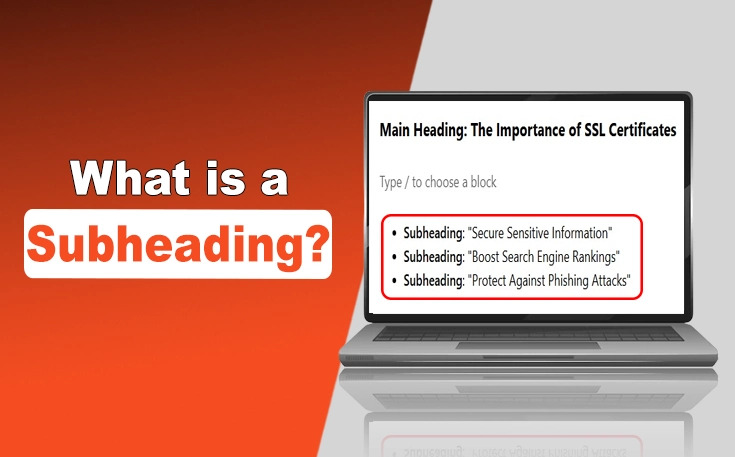
A subheading is a secondary heading within an article that organizes content into distinct sections, improving readability and helping readers navigate key topics. It typically appears below a main heading and uses smaller font size or style to indicate its supporting role. Subheadings break up text visually and signal shifts in subject matter.
Can you give me an example of what a subheading looks like in writing?
A subheading usually appears in bold or italicized text, centered or left-aligned, and is often in a smaller font than the main heading. For example, under a main heading like "Benefits of Exercise", a subheading might read "Improves Mental Health" or "Boosts Cardiovascular Strength". It acts as a mini-title for a subsection.
How do you format a subheading in APA style, and what levels are there?
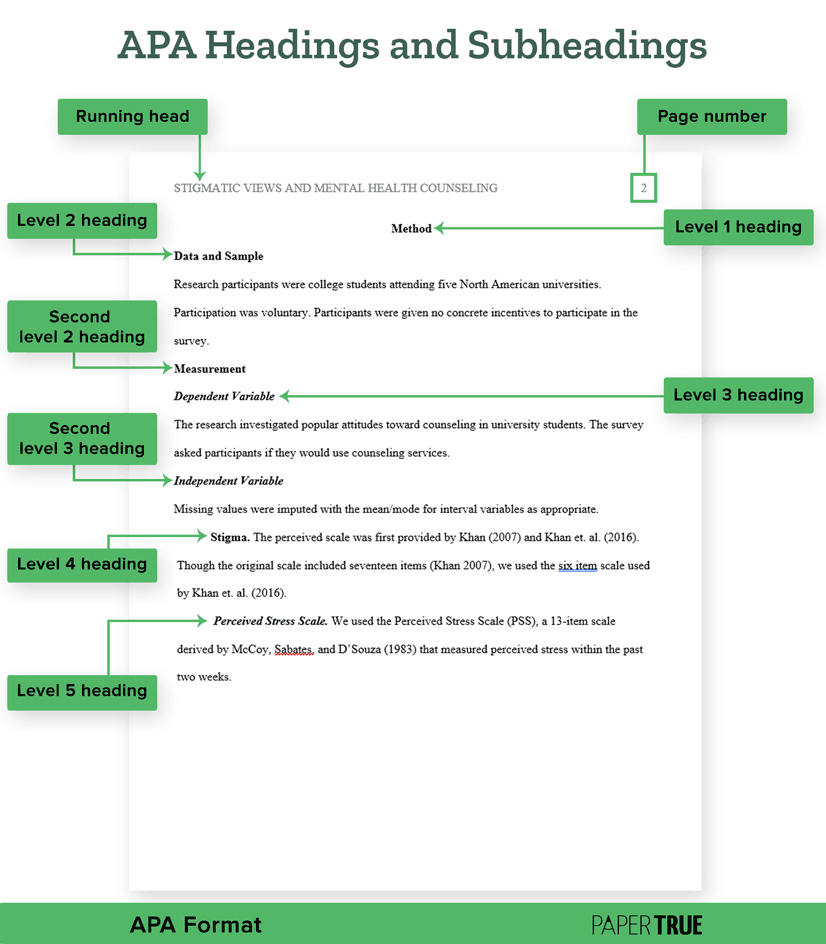
In APA style, subheadings follow a hierarchical structure with up to five levels. Level 1 is bold and title case (e.g., Main Topic), Level 2 is bold and italicized (e.g., Subtopic), and lower levels use additional formatting like bold + regular text or italics only. Each level further divides content for clarity.
What role do subheadings play in a research paper, and are they mandatory?
Subheadings in a research paper help structure complex information, guide readers through methodology, findings, and analysis, and meet formatting guidelines (e.g., APA, MLA). While not always mandatory, they’re essential for long papers to improve coherence and readability, especially in sections like Literature Review or Results.
Do essays require subheadings, and if so, how should they be structured?
Subheadings in essays are optional but useful for longer or complex essays (e.g., analytical or research-based). They should logically divide content (e.g., Background, Arguments, Counterarguments) and follow a consistent style (bold, italics, or numbering). Avoid overusing them in short, straightforward essays.
What is the purpose of subheadings in a paper, and how do they differ from headings?
Subheadings in a paper serve to break down broad topics into smaller, manageable parts, aiding both the writer’s organization and the reader’s comprehension. Unlike main headings (which introduce major sections), subheadings provide specificity, such as "Case Study Analysis" under "Methodology", and are typically styled less prominently.
Leave a Comment
Comments are moderated before appearing. The data you submit is processed according to the Privacy Policy of Voltefac.