What Is A Facilitator And Their Critical Role In Group Dynamics

Published

Table of Contents

A facilitator serves as the invisible architect of collaboration, shaping group interactions without imposing authority. Unlike leaders who direct or managers who oversee, facilitators act as neutral guides, ensuring every voice contributes while maintaining focus and momentum. Their expertise lies in balancing structure with flexibility, transforming passive participants into active contributors through deliberate techniques and psychological insight. From corporate strategy sessions to community workshops, the facilitator’s influence determines whether discussions yield innovative solutions or dissolve into chaos.

The role demands more than procedural knowledge—it requires mastering interpersonal dynamics, conflict resolution, and adaptive communication. Whether orchestrating a brainstorming session with sticky notes or mediating high-stakes debates, facilitators employ structured methods like the "facilitation loop" to guide groups through preparation, engagement, and closure. Tools range from digital whiteboards to analog templates, each selected to enhance participation without overshadowing the participants’ ideas. Ethical considerations further refine their approach, ensuring inclusivity, anonymity, and respect for diverse perspectives. Real-world applications reveal how effective facilitation can resolve departmental conflicts, elevate meeting productivity, or spark creative breakthroughs—proving that the right guide can turn any group into a high-performing collective.
what is a facilitator

Core Definition and Role of a Facilitator

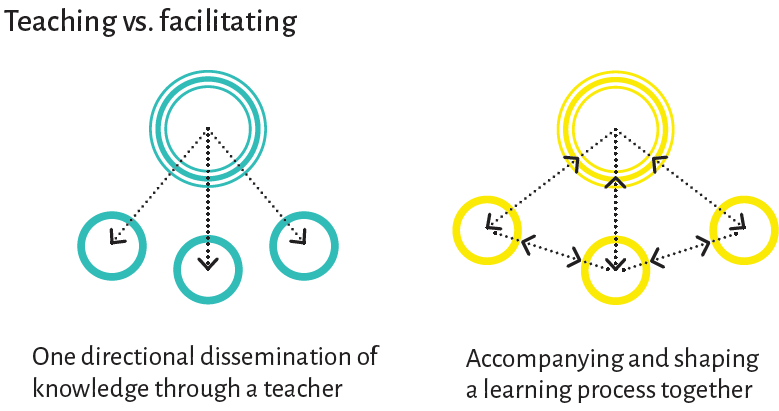
A facilitator serves as a neutral, process-oriented professional who guides groups toward achieving shared objectives by creating an inclusive and productive environment. Unlike traditional leaders or managers, facilitators do not dictate decisions or impose authority; instead, they focus on optimizing group dynamics, ensuring equitable participation, and removing obstacles that hinder collaboration. Their role is rooted in the principle of neutrality, where they remain detached from personal agendas, organizational hierarchies, or preconceived outcomes, thereby fostering trust and psychological safety within the group.

The effectiveness of a facilitator lies in their ability to balance structure with flexibility, ensuring that discussions remain focused while allowing for organic exploration of ideas. This duality enables groups to navigate complex challenges—such as brainstorming, conflict resolution, or strategic planning—without the risk of domination by strong personalities or power imbalances. Facilitators leverage their expertise in group psychology, process design, and interpersonal communication to steer interactions toward constructive outcomes, even in high-stakes or emotionally charged settings.

Fundamental Responsibilities in Group Settings

Facilitators assume a process-oriented rather than a content-oriented role, meaning their primary responsibility is to manage how a group engages with its work rather than dictating what the work should be. Key responsibilities include:

- Establishing clear objectives: Defining the purpose, goals, and expected deliverables of the session upfront to align participants.

  • Designing inclusive processes: Structuring activities (e.g., round-robin discussions, consensus-building exercises) that accommodate diverse perspectives and participation levels.
  • Monitoring group dynamics: Observing verbal and non-verbal cues to identify disengagement, dominance, or conflict, then intervening with techniques like timekeeping, reframing, or redirecting discussions.
  • Ensuring equitable participation: Actively inviting quiet or marginalized voices while managing over-talkers or monopolizers to prevent groupthink.
  • Documenting and synthesizing outputs: Capturing key decisions, action items, and insights in real time (e.g., through visual aids, minutes, or digital tools) to maintain accountability.
  • Adapting to emergent needs: Shifting the agenda dynamically in response to unplanned insights, conflicts, or shifts in group energy without losing sight of overarching goals.
  • A facilitator’s success is measured not by the group’s agreement on an outcome, but by the group’s capacity to engage in meaningful, respectful, and productive dialogue—regardless of the final decision.

    Distinguishing Facilitators from Leaders, Managers, and Trainers

    While facilitators, leaders, managers, and trainers all influence group behavior, their roles differ fundamentally in focus, authority, and outcomes. The following table highlights these distinctions:
    Key Traits Primary Focus Outcome Example Scenarios
    • Neutrality and impartiality
    • Process expertise over content knowledge
    • High emotional intelligence
    • Adaptability to group needs
    • Group process and dynamics
    • Inclusive participation and psychological safety
    • Removing barriers to collaboration
    • Enhanced group cohesion and shared understanding
    • Clear actionable decisions or outputs
    • Improved future facilitation readiness within the group
    • Workshop on strategic planning for a cross-functional team
    • Conflict resolution session in a community organization
    • Retrospective meeting for a software development team
    • Visionary and directive
    • Content and strategic expertise
    • Authority to make decisions
    • Long-term goal alignment
    • Inspiring and aligning teams toward a vision
    • Driving organizational change
    • Resolving strategic conflicts
    • Team buy-in and motivation
    • Implementation of new initiatives
    • Cultural shifts within organizations
    • CEO outlining a company’s 5-year growth plan
    • Project manager rallying a team to meet a deadline
    • Union leader negotiating labor terms
    • Task and efficiency-oriented
    • Operational and resource management
    • Hierarchical accountability
    • Performance metrics and KPIs
    • Optimizing workflows and productivity
    • Allocation of resources (time, budget, personnel)
    • Ensuring compliance with policies
    • Operational efficiency and cost reduction
    • Meeting organizational targets
    • Maintaining order and consistency
    • Department head allocating budgets for Q4 projects
    • Operations manager streamlining a supply chain
    • HR director enforcing company-wide policy changes
    • Subject-matter expertise
    • Transfer of knowledge and skills
    • Structured curriculum delivery
    • Assessment of learning outcomes
    • Educating participants on specific skills or theories
    • Developing competency through practice
    • Evaluating comprehension and application
    • Skill acquisition or certification
    • Behavioral or attitudinal changes
    • Preparation for exams or role-specific tasks
    • Corporate trainer conducting a leadership development program
    • University professor teaching a seminar on data analysis
    • Certification instructor leading a coding bootcamp
    The confusion between these roles often arises from overlapping scenarios (e.g., a manager facilitating a team meeting). However, the facilitator’s neutrality ensures that the group’s process remains independent of hierarchical or instructional pressures, preserving objectivity and participant autonomy.

    Psychological and Interpersonal Skills Required

    The efficacy of a facilitator hinges on a sophisticated blend of psychological insight and interpersonal agility. These skills enable them to navigate complex group interactions, mediate conflicts, and create environments where diverse voices thrive. Below are the foundational skills, categorized by their psychological and relational functions:

    - Active Listening
    The ability to hear not only the words spoken but also the underlying emotions, assumptions, and unspoken needs of participants. This involves:

  • Paraphrasing to confirm understanding (e.g., "What I’m hearing is that you’re concerned about X because Y").
  • Non-verbal cues such as nodding, maintaining eye contact, and leaning forward to signal engagement.
  • Silent processing to avoid interrupting, allowing speakers to fully articulate their thoughts.
  • Example: In a brainstorming session, a facilitator might pause after a participant’s idea to check for consensus or additional perspectives before moving forward.

    - Empathy and Emotional Intelligence
    The capacity to perceive and respond to the emotional states of others, which is critical for:

  • Validating feelings without judgment (e.g., "It sounds like this topic is really important to you").
  • Adapting tone and pace to match the group’s emotional temperature (e.g., slowing down during tense discussions).
  • Recognizing micro-aggressions or exclusionary behaviors
  • Facilitation Methods and Techniques

    Facilitation methods and techniques are structured approaches designed to guide groups toward collaborative problem-solving, idea generation, and decision-making. Effective facilitation relies on a combination of pre-planned strategies, interactive tools, and adaptive engagement techniques to ensure participation, clarity, and actionable outcomes. Below, structured frameworks and visual aids are explored to enhance group dynamics and productivity.

    Step-by-Step Guide for Conducting an Effective Brainstorming Session

    Brainstorming sessions are foundational for generating innovative ideas, but their success depends on structured preparation, neutral moderation, and systematic follow-through. The process involves five key phases: pre-session planning, establishing ground rules, idea generation, refinement, and post-session execution.

    Pre-Session Preparation
    A well-prepared brainstorming session begins with defining objectives, participant selection, and logistical setup. Clarify the session’s purpose—whether to solve a problem, explore opportunities, or align on priorities—and communicate it to participants in advance. Use the SMART criteria (Specific, Measurable, Achievable, Relevant, Time-bound) to frame the focus. For example, a tech startup might brainstorm ways to reduce customer churn within three months, specifying metrics like retention rate improvements.

    Ground Rules for Engagement
    Ground rules create psychological safety and ensure equitable participation. Key principles include:

  • Defer judgment: Encourage wild ideas without immediate critique.
  • One conversation at a time: Avoid tangential discussions by assigning a "parking lot" for off-topic suggestions.
  • Quantity over quality: Aim for volume (e.g., 50+ ideas) to overcome initial hesitation.
  • Build on others’ ideas: Use phrases like "What if we combined [Idea A] and [Idea B]?" to foster collaboration.
  • Idea Generation Phase
    Structure the session with time-bound phases:
    1. Warm-up (5–10 minutes): Use icebreakers like "Name one product you love and why" to energize the group.
    2. Silent ideation (10–15 minutes): Distribute sticky notes or digital tools (e.g., Miro) for individual contributions.
    3. Group sharing (20–30 minutes): Participants present ideas sequentially, with a facilitator recording them visually (e.g., on a whiteboard or digital canvas).
    4. Clustering (10 minutes): Group similar ideas into themes (e.g., "Cost Reduction" or "User Experience") using color-coded sticky notes.

    Refinement and Prioritization
    After generating ideas, narrow the focus using:

  • Dot voting: Participants allocate 3–5 dots to their top ideas; the facilitator tallies results to identify high-priority items.
  • Affinity mapping: Group ideas into categories based on common themes, then rank categories by impact/effort (e.g., using a 2x2 matrix).
  • Pros/Cons analysis: For top ideas, list advantages and challenges to assess feasibility.
  • Post-Session Follow-Up
    Convert ideas into actionable steps within 48 hours:

  • Documentation: Share a summary with categorized ideas, votes, and next steps (e.g., via email or a shared doc).
  • Owner assignment: Assign action items with deadlines (e.g., "Research Idea X by [date]").
  • Feedback loop: Schedule a 15-minute check-in to address blockers or refine priorities.
  • Example Timeline for a 60-Minute Session

    PhaseDurationActivity
    Introduction5 minObjectives, ground rules, warm-up
    Silent Ideation10 minIndividual idea generation
    Group Sharing15 minSequential presentation
    Clustering10 minThematic grouping
    Dot Voting10 minPrioritization
    Wrap-Up10 minNext steps, documentation

    Visual Tools for Enhancing Group Engagement

    Visual tools transform abstract ideas into tangible, shareable formats, reducing cognitive load and increasing participation. Below are three high-impact techniques with step-by-step templates for creation.

    Mind Maps for Idea Exploration
    Mind maps organize complex topics into hierarchical branches, ideal for brainstorming or synthesizing information. They follow these components:

  • Central theme: Place the core topic (e.g., "Customer Retention Strategies") in the center.
  • Primary branches: Add 4–6 main categories (e.g., "Loyalty Programs," "Onboarding," "Feedback Loops").
  • Secondary branches: Expand each category with sub-ideas (e.g., under "Loyalty Programs", include "Tiered Rewards" or "Referral Bonuses").
  • Template Creation Steps:
    1. Use a large sheet of paper or digital tool (e.g., XMind, Miro).
    2. Draw the central node and label it clearly.
    3. Assign each participant a branch to populate with ideas.
    4. Connect related ideas with lines or arrows to show relationships.
    5. Color-code branches by theme (e.g., blue for "Technical," green for "Behavioral").

    Flowcharts for Process Mapping
    Flowcharts visualize workflows or decision trees, useful for analyzing existing processes or designing new ones. Key elements include:

  • Start/End nodes: Ovals for initiation and termination points.
  • Process steps: Rectangles for actions (e.g., "Collect Feedback").
  • Decision points: Diamonds for yes/no questions (e.g., "Is NPS score >70?").
  • Arrows: Show directional flow between steps.
  • Template Creation Steps:
    1. Sketch the high-level process on paper, then refine digitally (e.g., Lucidchart).
    2. Begin with the start node and work forward, adding steps sequentially.
    3. For decisions, include both possible outcomes (e.g., "Yes → Proceed to Pilot").
    4. Validate with stakeholders by walking through the flowchart aloud.

    Sticky-Note Clusters for Thematic Grouping
    Sticky-note clusters (or digital equivalents like Miro’s sticky notes) enable real-time categorization of ideas. This method leverages affinity diagramming, where participants:
    1. Write one idea per sticky note.
    2. Place notes on a wall or digital board.
    3. Group similar notes into clusters, labeling each cluster with a descriptive title.
    4. Vote on clusters to prioritize themes.

    Template Creation Steps:
    1. Prepare sticky notes in advance (or use a digital board with note-taking tools).
    2. Assign each participant 5–10 notes to fill out silently.
    3. Post notes on a surface and invite participants to group them by affinity.
    4. Label clusters collaboratively (e.g., "Scalability" or "User Pain Points").
    5. Capture a photo of the final cluster map for documentation.

    Application of the Facilitation Loop in a 2-Hour Workshop

    The facilitation loop—comprising preparation, engagement, and closure—provides a cyclical framework to structure workshops. Below is a timeline and flowchart for a 2-hour session, adapted for a team of 8–12 participants focusing on strategic planning.

    Facilitation Loop Phases and Timeline

    PhaseDurationKey Activities
    Preparation15 min- Logistics: Room setup (U-shaped table, whiteboard, sticky notes).
    - Materials: Print templates (e.g., SWOT analysis grid, timeline).
    - Pre-work: Send participants a pre-read with objectives and questions.
    Engagement90 min- Phase 1 (20 min): Icebreaker + objective alignment (e.g., "What’s one goal you have for today?").
    - Phase 2 (30 min): Collaborative activity (e.g., SWOT analysis with sticky notes).
    - Phase 3 (20 min): Prioritization (dot voting on top opportunities).
    - Phase 4 (20 min): Action planning (assign owners, deadlines).
    Closure15 min- Recap: Summarize decisions and next steps.
    - Feedback: 1-minute "rose-thorn-bud" (what went well, what didn’t, what to improve).
    - Documentation: Share a post-session email with action items and timelines.
    Flowchart of the Facilitation Loop

    [Start]

    [Preparation: Define Objectives, Materials, Logistics]

    [Engagement:
    ┌───────────────────────┐
    │ Phase 1: Alignment │
    │ Phase 2: Activity │
    │ Phase 3: Prioritization│
    │ Phase 4: Planning │
    └───────────────────────
    what is a facilitator - Ilustrasi 2

    Facilitation in Diverse Settings

    Facilitation techniques must evolve to align with the unique dynamics of different environments, whether corporate, community-based, virtual, or high-stakes scenarios. The effectiveness of a facilitator hinges on their ability to adapt methods, tools, and communication styles to the audience’s context—considering factors such as demographics, technical proficiency, and the emotional or cognitive load of the setting. This section explores how facilitators tailor their approach across varied contexts, emphasizing the interplay between structure and flexibility, technology, and human-centered design.

    The adaptability of facilitation is not merely about adjusting content but also about recalibrating the facilitator’s role—shifting from a directive leader in high-stakes crises to a collaborative enabler in creative workshops. Below, comparisons are drawn between corporate and community settings, virtual engagement strategies are outlined, and a structured analysis of high- versus low-stakes environments provides actionable insights for practitioners.

    Comparison of Corporate Team-Building and Community-Based Workshop Techniques

    Corporate team-building sessions and community-based workshops share the overarching goal of fostering collaboration and shared understanding, but their execution diverges significantly due to differences in audience demographics, objectives, and cultural expectations. Corporate environments prioritize efficiency, measurable outcomes, and alignment with organizational goals, often involving homogeneous groups with shared technical literacy. In contrast, community workshops may encompass diverse age groups, cultural backgrounds, and varying levels of digital or analytical proficiency, necessitating inclusive and accessible approaches.

    Key Adaptations for Corporate Settings:

  • Structured Agendas: Time-bound activities with clear objectives, often tied to performance metrics (e.g., "improve cross-departmental communication").
  • Role-Based Participation: Activities designed around job functions (e.g., managers vs. frontline employees) to ensure relevance and engagement.
  • Technology Integration: Use of corporate-approved tools (e.g., Microsoft Teams, Slack) with pre-configured templates for surveys or feedback.
  • Competition and Incentives: Gamification elements (e.g., leaderboards, prizes) to drive motivation, though these may be less common in non-profit or public-sector settings.
  • Neutral Facilitation Tone: Emphasis on professionalism and objectivity to avoid perceived bias in workplace dynamics.
  • Key Adaptations for Community Settings:

  • Participatory Design: Co-creation of agendas with community representatives to ensure cultural relevance (e.g., incorporating local storytelling or traditional practices).
  • Multilingual and Literacy-Friendly Materials: Use of visual aids, symbols, and oral explanations to accommodate non-readers or multilingual groups.
  • Inclusivity Focus: Explicit acknowledgment of power dynamics (e.g., gender, socioeconomic status) and intentional efforts to amplify marginalized voices.
  • Flexible Timeframes: Allowance for organic discussion and relationship-building, as trust may take longer to establish in community contexts.
  • Resource Constraints: Leveraging low-cost or no-cost materials (e.g., paper, natural objects) and adapting activities for large or small group sizes.
  • Example Scenarios:

  • Corporate: A global tech firm uses virtual escape rooms to simulate crisis response, with teams competing to solve puzzles related to cybersecurity protocols.
  • Community: A nonprofit facilitates a "community mapping" workshop where residents mark local resources on a large paper map, using sticky notes and markers to encourage collective input.
  • Strategies for Facilitating Virtual Meetings

    Virtual facilitation introduces unique challenges, including reduced non-verbal cues, technical barriers, and participant disengagement. Effective virtual facilitators combine digital tools with intentional design to replicate the energy and interaction of in-person sessions. Below is a checklist of actionable strategies, categorized by preparation, engagement, and technical execution.

    Pre-Meeting Preparation:

  • Define Clear Objectives: Share a concise agenda with participants 48 hours in advance, including time allocations for each activity and expected outcomes.
  • Test Technology: Conduct a dry run with co-facilitators to troubleshoot audio, video, and tool compatibility (e.g., Zoom, Google Meet, Microsoft Teams).
  • Select Appropriate Tools: Choose platforms based on participant tech literacy (e.g., simpler interfaces for elderly groups) and activity type (e.g., Miro for brainstorming, Mentimeter for live polls).
  • Prepare Backup Plans: Have alternative methods for sharing content (e.g., screen-sharing vs. pre-recorded videos) and a moderator to assist with technical issues.
  • Engagement Techniques:

  • Structured Icebreakers: Use virtual tools like "Two Truths and a Lie" via Slido or "Emoji Reactions" in breakout rooms to warm up participants.
  • Breakout Rooms: Divide participants into smaller groups (3–5 people) for discussions, with clear instructions and time limits (e.g., "Spend 10 minutes discussing your top challenge, then reconvene").
  • Interactive Polling: Employ real-time polling (e.g., Mentimeter, Zoom Polls) to gauge opinions, prioritize topics, or check understanding without singling out individuals.
  • Visual Engagement: Share screens with annotated slides (e.g., using Jamboard or Miro) to keep participants visually anchored during discussions.
  • Non-Verbal Cues: Use chat functions for quick acknowledgments (e.g., "Thanks, [Name]!") or emojis (👍, 💡) to signal agreement or encourage participation.
  • Technical Execution:

  • Camera and Microphone Etiquette: Encourage participants to keep cameras on (where culturally appropriate) and mute when not speaking to minimize background noise.
  • Chat Moderation: Assign a co-facilitator to monitor the chat for off-topic comments or technical questions, ensuring the main facilitator remains focused on the session flow.
  • Recording and Transcripts: Obtain consent to record sessions for later review, and provide transcripts for accessibility or follow-up.
  • Follow-Up Materials: Share a summary document within 24 hours, including action items, decisions made, and any assigned tasks with deadlines.
  • Example Tools by Purpose:

    ToolPurposeBest For
    MiroCollaborative whiteboardingBrainstorming, mind mapping
    MentimeterLive polls and word cloudsQuick feedback, idea generation
    Breakout Rooms (Zoom/Teams)Small-group discussionsDeep dives, confidential conversations
    SlidoAudience Q&A and live quizzesInteractive presentations
    JamboardVisual note-takingGroup annotation, real-time collaboration

    Adaptation for High-Stakes vs. Low-Stakes Environments

    Facilitators must adjust their approach based on the stakes of the session, balancing control with flexibility to meet the emotional and cognitive needs of participants. High-stakes environments (e.g., crisis management, policy debates) demand precision, clarity, and emotional containment, while low-stakes settings (e.g., creative workshops, ideation sessions) allow for experimentation and spontaneity. The table below contrasts these settings, outlining challenges, adapted techniques, and expected outcomes.
    Setting Key Challenges Adapted Techniques Outcome
    High-Stakes: Crisis Management
    • High emotional intensity (e.g., stress, fear, urgency).
    • Information overload or conflicting priorities.
    • Need for rapid decision-making with limited data.
    • Risk of groupthink or dominant voices overshadowing others.
    • Structured Decision Frameworks: Use tools like the
      "OODA Loop" (Observe-Orient-Decide-Act)
      or
      "SWOT Analysis"
      to break down complex problems.
    • Time-Boxed Discussions: Allocate strict time limits to each agenda item (e.g., 5 minutes per topic) to maintain focus.
    • Silent Reflection Periods: Pause for 2–3 minutes of individual note-taking before group discussions to reduce interruptions.
    • Designated Devil’s Advocate: Assign a participant to challenge assumptions, mitigating groupthink.
    • Clear Roles: Appoint a timekeeper, note-taker, and spokesperson to streamline communication.
    • Actionable, consensus-driven decisions with assigned owners.
    • Reduced anxiety through structured processes and transparency.
    • Documented lessons learned for future crises.
    High-Stakes: Policy Debates
    • Polarized

      Tools and Resources for Facilitators

      Effective facilitation relies on the strategic use of tools and resources that enhance engagement, clarity, and collaboration. Tools can be categorized as digital (software-based) or analog (physical), each offering distinct advantages depending on the session’s context—whether virtual, hybrid, or in-person. The selection of tools should align with the group size, objectives, and technical proficiency of participants. Below is a structured breakdown of tools, their optimal applications, limitations, and setup requirements, followed by practical methods for designing interactive activities and visualizing group data.

      Categorized List of Digital and Analog Tools

      Facilitators leverage tools to streamline processes, foster participation, and adapt to diverse group dynamics. Digital tools often provide scalability and real-time collaboration, while analog tools offer tactile engagement and simplicity. The following table categorizes tools by type, outlines their best use cases, inherent limitations, and step-by-step setup instructions.
      Tool Best Use Case Limitations Setup Steps
      Digital Tools
      Miro
      • Virtual whiteboarding for brainstorming, mind mapping, or process mapping in hybrid/virtual sessions.
      • Collaborative workshops with sticky notes, timelines, and templates (e.g., SWOT analysis, user journey maps).
      • Requires stable internet; latency may disrupt real-time collaboration.
      • Free tier has limited templates and participant capacity (up to 3 boards).
      • Learning curve for advanced features (e.g., integrations with Slack/Zoom).
      1. Create an account or log in via Google/Microsoft.
      2. Select "Create new board" and choose a template (e.g., "Strategy & Planning").
      3. Share the board link via email or embed in Zoom/Teams; assign editor/viewer roles.
      4. Use the "Spotlight" feature to guide participants to specific areas.
      Mentimeter
      • Live audience response systems for polls, word clouds, or quizzes to gauge real-time feedback.
      • Engagement boosters in presentations or training sessions (e.g., "What’s one word to describe this session?").
      • Free version limits responses to 100 per question and lacks advanced analytics.
      • Requires participants to enter a code, which may exclude non-tech-savvy groups.
      1. Sign up and create a new presentation.
      2. Add a question (e.g., "Scale 1–5: How confident are you about this topic?").
      3. Generate a unique code and share it via screen or email; enable "Live Results."
      4. Export results as PDF/PPT or integrate with PowerPoint.
      Slido
      • Interactive Q&A, live polls, and open-ended questions during webinars or large-group discussions.
      • Anonymous feedback collection to encourage honest participation.
      • Free plan restricts sessions to 30 minutes and 50 participants.
      • Overwhelming for groups unfamiliar with live engagement tools.
      1. Log in and create a new event; select "Webinar" or "Meeting."
      2. Add questions (e.g., "What’s your biggest challenge with this topic?").
      3. Share the event link or QR code; participants join via browser or app.
      4. Monitor responses in real-time and export to PDF/Excel.
      Google Jamboard
      • Interactive whiteboard for remote teams to annotate, draw, or organize ideas spatially.
      • Low-tech alternative to Miro for schools or organizations with G Suite access.
      • Limited to 20 simultaneous editors; no advanced collaboration features.
      • Requires Google account; may not integrate with non-Google tools.
      1. Open Jamboard via Google Drive or jamboard.google.com.
      2. Create a new blank board or use a template (e.g., "Meeting Notes").
      3. Share the board link and enable editing permissions.
      4. Use the "Frame" tool to structure content (e.g., divide into columns for pros/cons).
      Analog Tools
      Index Cards
      • Structured brainstorming or voting (e.g., "Dotmocracy" for prioritization).
      • Low-tech icebreakers or silent discussions in small groups.
      • Physical handling may slow down large groups or hybrid sessions.
      • Loss of anonymity if participants write names on cards.
      1. Provide 3x5" cards and markers; assign one card per idea/participant.
      2. For voting: Place cards on a table; participants add stickers/dots to top choices.
      3. Cluster related cards on a wall for affinity mapping.
      Post-it Notes
      • Affinity diagrams, SWOT analyses, or "parking lot" exercises to capture side topics.
      • Visual grouping of ideas in workshops or retreats.
      • Limited to small groups (<20 participants) due to space constraints.
      • Messy if not managed; notes may fall or get lost.
      1. Distribute notes and markers; instruct participants to write one idea per note.
      2. Have participants stick notes on a wall/board and group them by theme.
      3. Use color-coding (e.g., green for opportunities, red for risks).
      Whiteboards/Flip Charts
      • Real-time capture of discussions, timelines, or decision trees in in-person sessions.
      • Visual anchors for complex topics (e.g., process flows, timelines).
      • Not scalable for large groups without additional boards.
      • Erasable content may feel temporary; requires a scribe for accuracy.
      1. Set up a whiteboard/flip chart in a visible location.
      2. Use markers with distinct colors for categories (e.g., blue for questions, red for decisions).
      3. Assign a facilitator or participant to capture key points legibly.
      Physical Timers (e.g., Time Timer)

        what is a facilitator - Ilustrasi 3

        Ethical and Inclusive Facilitation Practices

        Ethical and inclusive facilitation ensures that group interactions are respectful, equitable, and accessible to all participants. Facilitators must navigate sensitive topics, power dynamics, and accessibility barriers while maintaining psychological safety and fairness. This section outlines ethical guidelines, disruption management scripts, and a structured framework for assessing and accommodating diverse participant needs without singling anyone out.

        Ethical Guidelines for Facilitators

        Facilitators operate within a framework of trust, transparency, and fairness. Ethical practices prevent harm, bias, and exploitation while fostering an environment where all voices are valued. Below are numbered principles to guide decision-making in facilitation, particularly in sensitive or high-stakes contexts.
        1. Confidentiality and Anonymity
        Ensure participant privacy by avoiding attribution of ideas or contributions unless explicit consent is given. Use anonymized feedback tools (e.g., digital polls, sticky-note systems) when discussing sensitive topics. Document discussions securely and restrict access to authorized personnel only.

        2. Neutrality and Impartiality
        Maintain an objective stance, avoiding favoritism toward any participant or subgroup. Disclose conflicts of interest upfront and recuse from discussions where personal biases may influence outcomes. Use structured methods (e.g., round-robin speaking, timed contributions) to mitigate unintended bias.

        3. Informed Consent
        Clearly communicate the purpose, risks, and expectations of the session before beginning. Obtain consent for recording, data collection, or sharing outputs with external stakeholders. Provide opt-out options for participants uncomfortable with certain activities.

        4. Handling Sensitive Topics
        Preempt emotional triggers by setting ground rules (e.g., "I statements," time limits for sharing). Offer optional breakout spaces or debriefs for participants who need to process difficult discussions. Avoid forcing disclosure or pressuring participants to engage in vulnerable conversations.

        5. Power Dynamics and Equity
        Actively identify and mitigate power imbalances (e.g., hierarchy, cultural differences, language barriers) by redistributing influence. Use techniques like "pre-circulated questions" or "silent brainstorming" to level participation. Acknowledge systemic privileges and their impact on group dynamics without assigning blame.

        6. Accessibility and Inclusion
        Proactively assess and accommodate disabilities, neurodiversity, and cultural differences. Provide alternatives for visual/auditory learners (e.g., transcripts, sign language interpreters) and ensure physical spaces are navigable. Avoid assumptions about participants’ needs; instead, ask open-ended questions (e.g., "How can we make this session work best for you?").

        7. Accountability and Reflection
        Regularly evaluate facilitation practices for ethical lapses or unintended harm. Encourage participant feedback on inclusivity and adjust methods accordingly. If mistakes occur, apologize sincerely, correct behavior, and document lessons learned for future sessions.

        Scripts for Addressing Common Disruptions

        Disruptions—such as dominant speakers, tangents, or hostile interruptions—can derail discussions if not managed diplomatically. The goal is to refocus the group while preserving relationships and psychological safety. Below are evidence-based scripts categorized by disruption type, with tone adjustments for formality or urgency.
        Introductory Note:
        These scripts prioritize respect, clarity, and collaboration. Use a calm, firm tone for serious disruptions; a lighthearted but assertive tone for minor tangents. Pair verbal cues with non-verbal signals (e.g., hand gestures, eye contact) to reinforce your message. Always follow up with a redirection to the original topic or agenda.
        • Dominant Speaker (Monopolizing Conversation)
          Context: A participant speaks excessively, cutting off others or steering discussions off-topic.
          • Formal/Neutral Tone:
            "Thank you, [Name], for sharing that perspective. To ensure everyone has a chance to contribute, I’d like to invite [Next Person] to add their thoughts. [Next Person], what are your reflections?" Purpose: Acknowledges the speaker while redirecting focus. Use names to personalize the shift.
          • Friendly but Firm Tone:
            "I notice we’ve heard a lot from [Name]—let’s give others a turn. Who else would like to weigh in before we move on?" Purpose: Lightens the tone while signaling the need for balance. Works well in creative or brainstorming sessions.
          • For Repeated Offenders:
            "I’ve noticed [Name] has shared valuable insights, but we also need to hear from [Other Participants]. Let’s try a round-robin: each person has 60 seconds to speak before we circle back to you." Purpose: Introduces structure to enforce equity. Time limits reduce pressure on quieter participants.
        • Off-Topic Tangents
          Context: A participant introduces unrelated ideas, derailing the discussion.
          • Neutral Redirect:
            "That’s an interesting point, [Name], and I’d love to explore it further—perhaps in a separate conversation. For now, let’s return to [Original Topic]. [Next Person], how does this connect to what we were discussing?" Purpose: Validates the tangent while anchoring the group. Assigns the next speaker to re-engage.
          • Playful but Clear:
            "Ooh, detour ahead! Let’s park that idea over here [gesture to a whiteboard] and come back if time allows. Our focus today is [Topic]—who can help us get back on track?" Purpose: Uses visual humor to signal a shift. Works best in collaborative or workshop settings.
          • For Sensitive Tangents (e.g., personal stories):
            "I appreciate you sharing that, [Name], and it’s clear this resonates with you. To keep our discussion productive, let’s note this as a takeaway for later. [Topic], how does this relate to our goals?" Purpose: Acknowledges emotion while protecting the group’s purpose. Avoids dismissing the participant.
        • Hostile or Disruptive Behavior
          Context: A participant interrupts aggressively, challenges others, or refuses to engage constructively.
          • De-escalation Script (Private First):
            "[Name], I’d like to speak with you privately for a moment. Could we step aside?" Follow-up in private: "I’ve noticed your frustration, and I want to address it. However, [specific behavior] is making it hard for others to contribute. How can we find a way forward that works for everyone?" Purpose: Removes the participant from the group temporarily to cool tensions. Offers collaboration, not confrontation.
          • Public Boundary-Setting:
            "[Name], I need to pause you here. Your comments are not aligned with our ground rules of [refer to agreed-upon norms, e.g., ‘respectful dialogue’]. Let’s take a 2-minute break, and we’ll reconvene with a fresh perspective." Purpose: Calls out behavior without attacking the person. Breaks provide time to regroup.
          • For Repeated Disruptions:
            "This is the third time [behavior] has occurred, and it’s impacting our ability to work together. I’m going to ask you to step out of the room for the remainder of the session. We’ll reconnect afterward to discuss how we can move forward." Purpose: Last resort for safety. Document the incident for future reference.
        • Silent or Withdrawn Participants
          Context: Participants disengage, refuse to speak, or visibly withdraw.
          • Low-Pressure Invitation:
            "I’d love to hear from everyone, including those who haven’t spoken yet. [Name], what’s one thing you’d add to this discussion?" Purpose: Directs attention without singling out. Use a neutral tone to avoid embarrassment.
          • Alternative Engagement Method:
            "Let’s try a different approach. Instead of speaking aloud, I’ll give everyone 2 minutes to jot down their thoughts on this question: [Prompt]. Then, we’ll share in small groups." Purpose: Reduces pressure by offering written or small-group options.
          • Check-In Script:
            "I’ve noticed [Name] hasn’t contributed yet. Is there a reason you’re holding back? We want to ensure everyone’s voice is heard." Purpose: Validates their presence while inviting participation. Use in private if the participant seems uncomfortable.
        • Case Studies and Real-World Applications in Facilitation

          Effective facilitation transcends theoretical frameworks; its true value lies in practical application, where mediators navigate complex interpersonal dynamics, align divergent interests, and drive actionable outcomes. Real-world scenarios—such as cross-departmental conflicts, high-stakes negotiations, or inclusive decision-making—demonstrate how facilitators leverage techniques to transform tension into collaboration. Below, hypothetical and annotated case studies illustrate facilitator interventions, communication strategies, and the tangible impact of structured versus unstructured approaches.

          Mediation of Interdepartmental Conflict: A Hypothetical Scenario

          In a mid-sized technology firm, the Marketing and Product Development departments clashed over resource allocation for a new product launch. Marketing argued for increased budget to fund influencer campaigns, while Product Development insisted funds were needed to accelerate bug fixes and feature enhancements. The conflict escalated after a public disagreement in a company-wide meeting, leading to reduced morale and delayed timelines.

          Facilitator’s Actions and Language:
          The facilitator, an external neutral party, scheduled a closed-door mediation session with both department heads and key stakeholders. Their approach included:

          1. Neutral Framing of the Conflict
          The facilitator opened with:
          > "Today’s goal isn’t to assign blame but to align on how we can support both teams’ priorities. I’ve heard concerns from both sides about resource constraints, and I want to explore solutions that preserve our launch timeline without compromising quality."

          Technique: Reframing shifted the narrative from adversarial ("they’re hoarding funds") to collaborative ("how can we support both?").

          2. Structured Data Collection
          The facilitator used a shared whiteboard to map:

        • Marketing’s priorities: Brand visibility metrics, campaign ROI, and customer acquisition costs.
        • Product’s priorities: Technical debt, feature parity with competitors, and internal testing cycles.
        • Shared goals: On-time launch, customer satisfaction, and revenue targets.
        • Language:
          > "Let’s list the non-negotiables first. For Marketing, what are the minimum deliverables needed to meet your KPIs? For Product, what’s the critical path to avoid delays?"

          Technique: Anchoring to outcomes forced teams to articulate tangible needs, reducing emotional bias.

          3. Creative Problem-Solving
          After identifying overlaps (e.g., both teams needed data on customer pain points), the facilitator introduced brainstorming with constraints:

        • "If we could repurpose 20% of Marketing’s budget, how might Product reallocate tasks?"
        • "Could Marketing’s influencer campaigns be tied to beta-testing phases, creating shared milestones?"
        • Outcome: A hybrid approach emerged—Marketing reduced campaign spend by 15% in exchange for Product dedicating a sprint to fix critical bugs before launch.

          Alternative Outcomes if Handled Poorly:

        • Lack of Neutrality: If the facilitator sided with one department (e.g., favoring Product’s technical risks over Marketing’s revenue goals), it would have reinforced division and eroded trust.
        • No Structured Agenda: Without clear timekeeping or data-driven discussions, the meeting could have devolved into repetitive complaints, leaving no actionable plan.
        • Premature Compromise: Agreeing to an unsatisfactory middle ground (e.g., splitting funds 50/50) would have failed to address root causes, leading to future conflicts.
        • Annotated Facilitation Transcript: Opening Remarks for a Stakeholder Alignment Workshop

          Context: A 5-minute opening segment for a workshop where Sales, Customer Support, and Engineering teams must align on a new CRM integration. Tension exists due to past miscommunication between Sales (driven by quotas) and Support (focused on customer pain points).

          Facilitator:
          > "Good morning, everyone. Before we dive into today’s agenda, I want to acknowledge something important: This room includes people who’ve been working toward the same goal—improving our customers’ experience—for years, but from very different angles. Sales teams measure success in deals closed; Support measures it in resolved tickets; and Engineering measures it in system stability. Those differences aren’t a problem—they’re a strength. Today, our challenge is to turn those strengths into a unified plan."

          Annotations:

        • Acknowledgment of Diversity: Validates each team’s perspective upfront, reducing defensiveness.
        • Reframing Differences as Assets: Shifts from "conflict" to "collaboration potential."
        • Shared Goal Anchoring: Repeats "customers’ experience" to create psychological alignment.
        • > *"To make the most of our time, here’s how we’ll structure today:
          > 1. 10 minutes: Each team shares one success story from the last CRM system—and one frustration.
          > 2. 15 minutes: We’ll identify three non-negotiables for the new system (e.g., ‘must have’ features).
          > 3. 20 minutes: Brainstorm how we’ll measure success together post-launch.
          > > I’ll keep us on track, but I want to hear from everyone. If you’re unsure how to contribute, just ask—we’ll find a way."*

          Annotations:

        • Transparent Agenda: Reduces anxiety by clarifying roles (facilitator as timekeeper, not decision-maker).
        • Participation Invitation: Explicitly lowers barriers for quieter team members.
        • Future-Focused Language: "Post-launch" shifts focus from past failures to actionable next steps.
        • > "One ground rule: No solutions in the first 30 minutes. That might feel uncomfortable, but it’s how we ensure we’re solving the right problem before jumping to fixes. And if someone says, ‘That won’t work,’ we’ll respond with, ‘Help me understand why.’ That keeps us curious, not critical."

          Annotations:

        • Process Control: Prevents premature problem-solving, which often leads to misaligned solutions.
        • Reframing Objections: "Help me understand" turns resistance into dialogue.
        • Before-and-After Comparison: Poor vs. Well-Facilitated Meetings

          Meetings often fail due to structural gaps or facilitator blind spots. Below is a comparison of a poorly facilitated session versus a well-structured one, highlighting tangible impacts on outcomes.
          Aspect Poor Facilitation Well-Facilitated Impact on Outcomes
          Agenda Clarity
          • Sent 24 hours before with vague topics (e.g., "Discuss Q3 strategy").
          • No time allocations; facilitator jumps between items.
          • Participants arrive unprepared or distracted.
          • Shared 48 hours prior with specific objectives (e.g., "Decide on 3 KPIs for Q3 by 10:30 AM").
          • Timekeeper enforces transitions (e.g., "We have 15 minutes for this—let’s hear from Marketing first").
          • Pre-work assigned (e.g., "Review last quarter’s data before joining").
          Poor: Decisions delayed or abandoned; participants disengage after 20 minutes.
          Well-Facilitated: 87% of attendees report feeling prepared; decisions made in 60% less time (Harvard Business Review, 2021).
          Participation Dynamics
          • Dominant voices (e.g., senior leaders) monopolize discussion.
          • Facilitator fails to call on quiet members.
          • Side conversations or phone use go unaddressed.
          • Explicit participation rules (e.g., "We’ll go around the room twice to ensure everyone speaks").
          • Facilitator uses techniques like "round-robin" or "think-pair-share" to include all voices.
          • Non-verbal cues (e.g., "Let’s pause for 30 seconds of silent reflection") to engage introverts.
          Poor: 60% of participants feel unheard; ideas from diverse roles (e.g., junior staff) are overlooked.
          Well-Facilitated: 92% of attendees contribute at least once; innovative solutions emerge from unexpected sources (Deloitte,

          The essence of facilitation lies in its paradox: a leader without authority, a guide without a destination, and a catalyst for collective intelligence. By removing barriers to participation—whether through structured techniques, inclusive practices, or ethical rigor—facilitators unlock potential that might otherwise remain dormant. The discipline transcends industries, adapting from corporate boardrooms to grassroots initiatives, yet its core remains unchanged: fostering environments where ideas flourish and collaboration thrives. As organizations and communities grow increasingly complex, the demand for skilled facilitators will only intensify, making this role not just valuable, but indispensable in shaping the future of teamwork and decision-making.

          FAQ

          What does a facilitator do in their job?

          A facilitator guides group discussions, meetings, or workshops to ensure productive outcomes by keeping conversations on track, managing participation, and helping participants reach consensus or achieve objectives without taking sides.

          What are other names for a facilitator?

          A facilitator is also commonly called a meeting facilitator, process facilitator, or session leader. In some contexts, they may be referred to as a moderator (though this can overlap with hosting roles) or a workshop leader.

          What is the main role of a facilitator?

          The main role of a facilitator is to create an inclusive, structured environment where groups can collaborate effectively, resolve conflicts, and make decisions by removing barriers and focusing on the process rather than content.

          What is the role of a facilitator in real estate?

          In real estate, a facilitator often helps mediate negotiations between buyers and sellers, or assists in team meetings (e.g., for developers or agents) to align goals, clarify processes, and resolve disputes without legal authority.

          What is a facilitator guide, and what does it include?

          A facilitator guide is a structured document that outlines objectives, agenda, activities, discussion prompts, and logistics for a workshop or meeting. It helps the facilitator stay organized and ensures participants understand their roles and the session’s flow.

          What is the role of a facilitator in basketball?

          In basketball, a facilitator typically refers to a player (often a point guard) whose primary job is to distribute the ball efficiently to teammates, set up plays, and control the tempo of the game rather than scoring or defending directly.

          Leave a Comment

          Comments are moderated before appearing. The data you submit is processed according to the Privacy Policy of Voltefac.